 how-to guide
How to Treat Digital Eye Strain: 7 Proven Methods
Table of Contents
- Understanding Digital Eye Strain: Symptoms and Causes
- Step 1: Apply the 20-20-20 Rule to Treat Digital Eye Strain
- Step 2: Optimize Ergonomics for Digital Eye Strain
- Step 3: Adjust Lighting and Reduce Glare
- Step 4: Use Artificial Tears and Lubricating Eye Drops
- Step 5: Invest in Best Computer Glasses for Eye Strain
- Step 6: Practice Eye Exercises for Digital Eye Strain
- Digital Eye Strain Prevention: Long-Term Strategies
Last Updated: July 22, 2026
Digital eye strain affects millions of people who spend extended hours staring at screens. Whether you work at a computer all day, attend virtual meetings, or scroll through your phone during breaks, the cumulative effect of screen time can leave your eyes tired, dry, and uncomfortable. At Wilck Schwartz & Novak OD PC, we've helped countless patients in Brooklyn manage and overcome digital eye strain through proven, practical strategies. This guide covers seven evidence-based methods to treat digital eye strain effectively, from simple daily habits to professional interventions.
Understanding Digital Eye Strain: Symptoms and Causes
Digital eye strain, also called computer vision syndrome, occurs when your eyes work harder than usual to focus on screens. Screens emit light at a different wavelength than natural objects, and your eyes must constantly refocus as you shift between text, images, and icons. Additionally, people blink 66% less frequently when looking at screens compared to normal reading, which reduces tear production and allows the ocular surface to dry out.
Common Symptoms of Digital Eye Strain
Symptoms of digital eye strain typically include blurred vision, especially when shifting your gaze between the monitor and distant objects. Dry eyes represent one of the most common complaints, that scratchy, burning sensation that makes you want to rub your eyes constantly. Headaches often develop at the temples or behind the eyes after several hours of focused screen work. Neck pain and shoulder tension frequently accompany eye fatigue because poor posture while viewing screens forces your head forward, straining both your cervical spine and your visual system. Some people report light sensitivity or difficulty focusing on distant objects after prolonged computer use.
These symptoms don't mean your vision is permanently damaged. They signal that your eyes need recovery time and environmental adjustments.
Why Screens Cause Eye Fatigue
Screens demand more visual effort than printed materials because pixels flicker at a rate your brain perceives as continuous but your eyes must constantly track. Blue light emitted by screens can suppress melatonin production, disrupting your circadian rhythm and making your eyes feel more strained as the day progresses.
Your accommodation system, the muscles that adjust your lens to focus at different distances, works overtime when viewing screens because you maintain a fixed focal distance for extended periods. This constant tension exhausts the ciliary muscles responsible for focusing. Combined with reduced blinking and the dry indoor air of most offices, the result is inevitable eye fatigue that compounds throughout the day.
Step 1: Apply the 20-20-20 Rule to Treat Digital Eye Strain
The 20-20-20 rule is the single most effective habit you can adopt to treat digital eye strain immediately. Every 20 minutes, look at something 20 feet away for at least 20 seconds. This simple practice resets your accommodation system and allows your tear film to redistribute across your eye surface.
When you focus on a distant object, your ciliary muscles relax completely, eliminating the tension that builds during near-vision tasks. The 20-foot distance represents optical infinity, the distance at which your eyes require minimal focusing effort. By shifting your gaze away from the screen, you also interrupt the reduced-blink pattern that screen work creates, naturally increasing tear production.
The 20-20-20 rule works best when you actually move your eyes to a distant focal point rather than just looking away from the screen. If you're in an office without a window, look down a hallway or across a large room. If you work from home, gaze out a window at trees, buildings, or the sky.
Step 2: Optimize Ergonomics for Digital Eye Strain
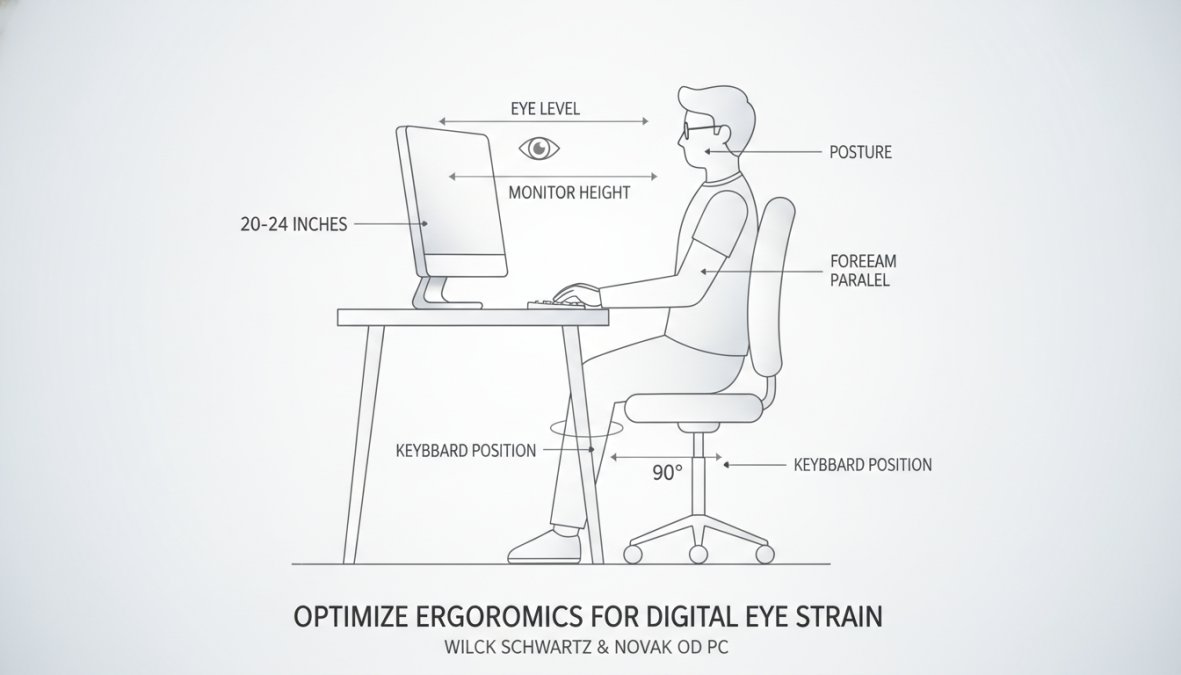
Ergonomics directly impact how much strain your eyes experience because poor workstation setup forces your eyes into unnatural positions and increases accommodation demand. When your monitor sits too high, too low, or too far away, your eyes must work harder to maintain focus.
Monitor Positioning and Viewing Distance
Your monitor should sit directly in front of you at arm's length distance, approximately 20-26 inches from your eyes. The top of the screen should be at or slightly below eye level when you're sitting upright with your shoulders relaxed. This positioning allows your eyes to gaze slightly downward, which naturally reduces the opening of your eyelids and slows tear evaporation.
Tilt the monitor slightly upward (about 15-20 degrees) so the screen slopes away from you rather than toward you. This angle reduces glare and positions the screen where your eyes naturally want to look.
Workstation Setup Checklist
| Setup Element | Correct Position | Impact on Eye Strain |
|---|---|---|
| Monitor distance | 20-26 inches from eyes | Reduces accommodation effort |
| Monitor height | Top at or below eye level | Decreases tear evaporation |
| Monitor angle | Tilted 15-20° upward | Reduces glare and neck strain |
| Keyboard position | Elbows at 90°, wrists neutral | Prevents forward head posture |
| Chair height | Feet flat on floor, hips level with knees | Maintains neutral spine alignment |
| Desk height | Elbows at 90° when arms rest on desk | Supports proper monitor positioning |
Step 3: Adjust Lighting and Reduce Glare
Glare and improper lighting create visual stress that intensifies digital eye strain significantly. When light reflects off your screen or shines directly into your eyes, your pupils constrict to compensate, increasing accommodation demand and causing discomfort.
Position your monitor perpendicular to windows rather than facing them directly. If you must face a window, close blinds or use a glare-reducing screen filter. Adjust overhead lights to eliminate reflections on your monitor surface, often by reducing overhead brightness and adding a desk lamp that illuminates your work surface without shining on the screen.
Anti-glare screen protectors and blue light filtering glasses both reduce glare-related strain. LED lighting produces less flicker than older fluorescent bulbs, so upgrading your desk lamp to LED can provide noticeable relief within days.
Step 4: Use Artificial Tears and Lubricating Eye Drops
Artificial tears address the root cause of many digital eye strain symptoms: insufficient tear production and rapid tear evaporation. When you reduce your blink rate during screen work, your tear film breaks down faster, leaving your ocular surface exposed and irritated.
Not all eye drops work equally well for digital eye strain. Preservative-free formulations are preferable for frequent use throughout the day. Look for drops containing hyaluronic acid or other hydrating agents that mimic natural tear composition. Apply drops when your eyes feel dry or fatigued, typically mid-morning and mid-afternoon for most office workers.
Use drops before your eyes feel severely dry rather than waiting until discomfort peaks. Many people find that applying drops every two hours during heavy screen work prevents symptoms from developing at all. If over-the-counter drops don't provide adequate relief after one week of consistent use, consult an eye care professional.
Step 5: Invest in Best Computer Glasses for Eye Strain
Computer glasses are prescription lenses optimized specifically for screen viewing distance, which differs from your normal reading distance. Standard glasses correct for distance vision or reading, but neither is optimal for the 20-26 inch viewing distance of most computer monitors. Computer eyeglasses reduce accommodation demand by approximately 50% compared to wearing no correction or wearing general-purpose glasses.
These specialized lenses feature a larger intermediate zone than bifocals, allowing smooth focus transitions across the entire screen. Many people report that switching to computer glasses eliminates their afternoon headaches entirely.
Blue Light Filtering Lenses
Blue light filtering lenses reduce the intensity of blue wavelengths reaching your retina, which can suppress melatonin production and increase visual stress during evening work. Many users report subjective improvement in comfort and reduced difficulty falling asleep after evening screen work when wearing blue light filtering lenses.
Consider reserving blue light glasses specifically for work after 6 PM rather than wearing them throughout the entire day. This approach preserves natural color perception benefits during daytime work while providing circadian support during evening hours.
At Wilck Schwartz & Novak OD PC, we can measure your specific screen distance and prescribe computer glasses customized to your exact viewing setup.
Step 6: Practice Eye Exercises for Digital Eye Strain
Eye exercises strengthen your accommodation system and improve focus flexibility, reducing the strain that accumulates during prolonged screen work. These exercises take just 3-5 minutes and can be performed at your desk.
The accommodation rock exercise trains your eyes to shift focus smoothly between near and far distances. Hold a pen at arm's length and focus on the text for 10 seconds, then shift your gaze to a distant object 20 feet away and focus for 10 seconds. Repeat this cycle 10 times.
The palming exercise provides mental and physical relaxation for your visual system. Rub your palms together to generate warmth, then gently cup them over your closed eyes without applying pressure. Breathe deeply and hold this position for 2-3 minutes, allowing your eyes to rest in complete darkness.
Convergence exercises improve your ability to coordinate both eyes when focusing on near objects. Hold a pen at arm's length and slowly bring it toward your nose while keeping it in focus. Stop when you can no longer maintain clear focus without discomfort, then slowly move the pen away. Repeat 10 times.
Digital Eye Strain Prevention: Long-Term Strategies
Treating digital eye strain requires both immediate interventions and sustainable long-term habits.
Screen Brightness and Contrast Adjustments
Your monitor's brightness setting dramatically affects how much strain your eyes experience. Excessive brightness forces your pupils to constrict, increasing accommodation demand and causing eye fatigue.
The ideal brightness setting matches your ambient room lighting. Set your monitor brightness so that the white areas of the screen don't appear to glow brighter than your surrounding environment. Higher contrast between text and background reduces the accommodation effort required to perceive content clearly.
Enable your monitor's night mode or use software like f.lux that automatically reduces blue light and increases color temperature as evening approaches. These tools gradually shift your screen's color profile without jarring transitions, and they support your natural circadian rhythm while reducing visual stress.
Hydration and Nutritional Support
Your tear production depends on systemic hydration, so drinking adequate water throughout the day directly supports tear film stability. Most people need 8-10 glasses of water daily.
Specific nutrients support eye health and tear production. Omega-3 fatty acids found in fish, flaxseed, and walnuts improve tear quality and reduce inflammation of the meibomian glands. Lutein and zeaxanthin, found in leafy greens and egg yolks, protect your retina from blue light damage. Vitamin A supports tear production and maintains healthy ocular surface tissue.
Research from the American Academy of Ophthalmology suggests that people consuming adequate omega-3 fatty acids experience significantly less dry eye symptoms during periods of heavy screen use.
Mobile vs. Desktop Strain Differences
Mobile devices create unique strain patterns because you typically hold them closer than desktop monitors and at more varied angles. The average person holds a phone 8-10 inches from their eyes, forcing extreme accommodation demand compared to the 20-26 inch distance of desktop work.
Hold your phone at arm's length when possible. Take more frequent breaks when using mobile devices, using the 20-20-20 rule every 15 minutes instead of every 20 minutes during intensive mobile work. Increase your phone's text size and brightness to reduce accommodation effort.
Tablet use occupies a middle ground between mobile and desktop work. Hold tablets at approximately 12-16 inches from your eyes, angled slightly away from you. Many people find that switching intensive reading or document work from phones to tablets reduces digital eye strain significantly.
Digital eye strain doesn't have to be a permanent consequence of screen-based work. By implementing these seven proven methods, starting with the 20-20-20 rule and progressing through ergonomic optimization, proper lighting, and targeted eye care, you can dramatically reduce discomfort and maintain visual health despite extensive screen exposure. If symptoms persist after implementing these strategies for two weeks, or if you experience sudden vision changes, schedule a comprehensive eye exam with an eye care professional. At Wilck Schwartz & Novak OD PC, we provide advanced diagnostic equipment to identify underlying conditions like dry eye syndrome or accommodation dysfunction that may require clinical treatment. We also offer customized computer glasses prescriptions and can recommend specific lubricating drops suited to your individual tear film composition. Schedule an appointment today to develop a personalized digital eye strain management plan tailored to your specific work environment and visual needs.
Frequently Asked Questions
What is the 20-20-20 rule for treating digital eye strain?
The 20-20-20 rule is a simple technique to reduce eye fatigue: every 20 minutes, look at something 20 feet away for 20 seconds. This helps your eyes relax their accommodation muscles, which become fatigued from focusing on screens at close range. Practicing this rule consistently throughout your workday can significantly reduce digital eye strain symptoms and improve overall visual comfort.
Can eye exercises help treat digital eye strain?
Yes, specific eye exercises can help treat digital eye strain by strengthening eye muscles and improving focus flexibility. Exercises like the near-far focus drill, palming, and eye rotations encourage your eyes to work through their full range of motion. Combined with frequent blinking and the 20-20-20 rule, these exercises reduce eye fatigue and can alleviate headaches and blurred vision associated with computer vision syndrome.
How do best computer glasses for eye strain differ from regular glasses?
Computer glasses are specifically designed to treat digital eye strain by featuring blue light filtering lenses and an optimized focal distance for screen viewing. Unlike regular prescription glasses, computer eyeglasses reduce glare and provide a wider field of focus at intermediate distances. They can significantly decrease symptoms like dry eyes, headaches, and neck pain caused by prolonged screen exposure and improper viewing angles.
When should I see an eye doctor about digital eye strain?
Schedule an appointment with an optometrist or ophthalmologist if digital eye strain symptoms persist despite trying self-care methods, if you experience severe headaches or vision changes, or if your symptoms interfere with work productivity. A comprehensive eye exam can rule out underlying vision problems, dry eye syndrome, or other ocular conditions that may be contributing to your discomfort. Early detection ensures precise treatment and better long-term outcomes.
This article was written using GrandRanker